To use WebTrader, your Internet Security and Privacy options
must be set to the default levels. To check, on the Tools menu select
Internet Options (IE) or Options (Firefox). On the Security and Privacy
tabs, click Default Level if
that button is active. If the button is gray, you are using the required
default levels.
To log into WebTrader
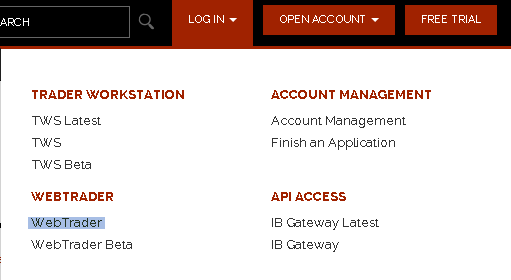
From the login menu in the upper
right corner of the IB home page, select WebTrader from
the drop-down list.
You will also
see the WebTrader Beta selection when available. The beta is a live
test version of the WebTrader application. You can log into beta to
test new features, but remember that you are still trading through
your live IB account.
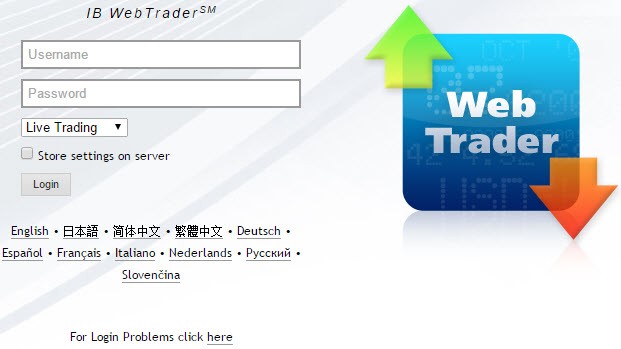
Enter your IB user name and password,
then click Login. To view
WebTrader in another language, select the language before you click
Login.
If you check the Store
settings on server check box when you log in, any changes you
make to your preferences, modes, market view and more will be saved
to a remote server and will be used the next time you log into WebTrader
regardless of where you initiate the session.
You can only be logged into one IB trading session
at a time, including TWS, MobileTrader or WebTrader.
If your session closes due to inactivity,
this does not affect any open orders you may have pending. To
resume trading, click Return
to WebTrader on the expiration page, and log back
in.
The first time you log into WebTrader,
it opens on the Market page, which displays market data for selected
instruments. On every subsequent login, WebTrader opens on the screen
that was displayed before your last logout.
Use the tabset at the top of the page to
create orders, view executions, monitor your account status, search
for market centers, view instrument-related fundamental analysis, and
create option chains.
Clicking the exclamation point button in
the upper right corner of the screen displays links to WebTrader Release
Notes in a new browser window.